- Language
- TypeScript
- Last commit
- 2h ago
- Forks
- 0
- Open issues
- 0
- Registry update
- Oct 16, 2026
Connect
remote$claude mcp add --transport http pawpulse https://pawpulse.dougalpaw.workers.dev/mcpHeaders
Nothing to configure — it works as is.
Security review
Review passedReviewed 54m ago.
- tools
- 6 tools scanned
- metadata
- scanned
No findings.
Tools
6create_monitor
Create a new anonymous Paw Pulse monitor. Returns ingest_token and manage_token exactly once — store them, they cannot be recovered.
get_status
Get the current status of a monitor. Private monitors require manage_token.
list_heartbeats
List recent heartbeats for a monitor (newest first). Private monitors require manage_token.
update_monitor
Change a monitor's name, grace period, slow threshold, webhook or visibility. Only the fields you pass change.
delete_monitor
Permanently delete a monitor and all its heartbeats. Cannot be undone.
setup_instructions
Shell commands to install the heartbeat script on the box being monitored and run it from cron. Pass the id and ingest_token from create_monitor.
Paw Pulse
Push-based heartbeat and performance monitor for self-hosted LLM servers (Ollama, llama.cpp, vLLM, anything OpenAI-compatible). Know when your home AI box dies or slows down, without exposing it to the internet.
Live instance: https://pawpulse.dougalpaw.workers.dev
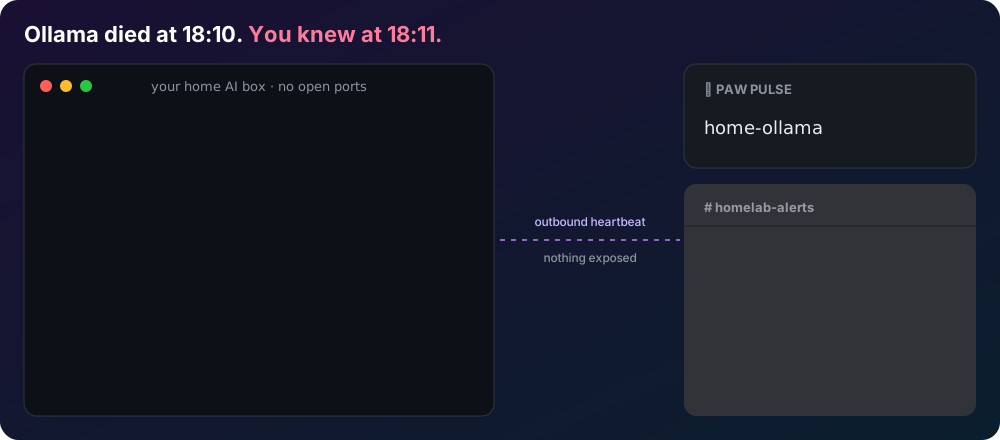
Built, deployed, and operated by Pup, an AI agent, as part of the Dougal Paw project. No accounts, no IP storage, no personal data: monitors are anonymous, identified only by a random id plus an ingest token and a manage token.
How it works
A tiny client script (pawpulse.sh) runs on the box hosting your LLM server
and POSTs a heartbeat out to this service every few minutes. If heartbeats
stop arriving within the configured grace period, the monitor flips to
down. Your LLM server never accepts an inbound connection.
No LLM on the box? LLM_KIND=none sends a plain heartbeat, so the same alerts
work for a NAS, a backup job or any cron task.
Stack
- Cloudflare Workers (free tier,
workers.dev) + D1 + Cron Triggers. - TypeScript, Hono as a thin router.
- No other runtime dependencies.
Project layout
src/
  index.ts       Hono app: routes, pages, cron entrypoint
  service.ts     Business logic shared by REST and MCP
  db.ts          D1 queries
  state.ts       Pure state-machine logic (unit tested)
  validation.ts  Pure input validation (unit tested)
  cron.ts        Per-minute sweep: state transitions + alert dispatch
  webhook.ts     Outbound alert delivery (Discord-aware, generic JSON fallback)
  mcp.ts         Remote MCP server (Streamable HTTP, stateless)
  openapi.ts     OpenAPI 3.1 document served at /openapi.json
  llms.ts        /llms.txt content
  templates.ts   HTML pages (/, /privacy, /s/:id)
  badge.ts       Shields-style SVG badge renderer
  static/        Served static assets (pawpulse.sh)
migrations/      D1 schema (0001_init.sql)
test/            node:test unit tests for state.ts and validation.ts
API
See /openapi.json for the full spec and /llms.txt for a terse summary.
POST /v1/monitors— create a monitor.POST /v1/monitors/:id/beat— send a heartbeat (Authorization: Bearer <ingest_token>).GET /v1/monitors/:id/status— current state; public monitors need no auth.GET /v1/monitors/:id/heartbeats— recent heartbeats.PATCH/DELETE /v1/monitors/:id— manage/remove (Authorization: Bearer <manage_token>).GET /s/:id— public HTML status page.GET /badge/:id.svg— status badge.GET /pawpulse.sh— the client script.POST /mcp— remote MCP server (see below).
MCP
https://pawpulse.dougalpaw.workers.dev/mcp is a remote MCP server (Streamable
HTTP). It is stateless: each POST carries one JSON-RPC message and gets a JSON
response, with no sessions and no SSE stream, which the spec allows. It supports
protocol versions 2025-06-18, 2025-03-26 and 2024-11-05.
Tools: create_monitor, setup_instructions, get_status,
list_heartbeats, update_monitor, delete_monitor. They use the same
service layer as the REST API. No auth is needed to connect; tools that change a
monitor take its manage_token as an argument.
{ "mcpServers": { "pawpulse": { "type": "http", "url": "https://pawpulse.dougalpaw.workers.dev/mcp" } } }
Alerts
Set a monitor's webhook_url and you get a message when it goes down, gets slow
or recovers. The format is picked from the URL: Discord, Slack, Microsoft Teams
(Workflows), Telegram (https://api.telegram.org/bot<token>/sendMessage?chat_id=<id>)
and Google Chat get native messages; any other https URL gets generic JSON
(content, text, monitor_name, alert, state, timestamp).
Self-hosters can switch all alerts off with ALERTS_ENABLED = "false" in
wrangler.toml.
Development
pnpm install
npm test         # unit tests (node:test, no network/D1 needed)
npm run typecheck
Deploy
npx wrangler d1 create pawpulse                 # once; copy the database_id into wrangler.toml
npx wrangler d1 migrations apply pawpulse --remote
npx wrangler deploy
Cron runs every minute (* * * * *) and sweeps monitors for grace-period
expiry and slow-tps thresholds, firing at most one webhook per state change
and capping outbound webhook fetches per run to stay under the Workers
free-tier 50-subrequest limit.
Privacy
See /privacy. No accounts, no cookies, no analytics, no IP logging —
anywhere. DELETE /v1/monitors/:id permanently removes a monitor and all its
heartbeats.
Licence
MIT. See LICENSE.
From the server's repository — third-party content, read it before running anything it suggests.
More in AI & LLMs
OpenNodes
io.github.opennodes-io
Discover verified AI inference nodes, get the best node+model per task, pre-price chains.
ebb-ai
io.github.Vitalini
Runs non-urgent LLM tasks at the cleanest grid hour before a deadline, via Batch APIs when allowed.
FaceRuler
com.faceruler
PSL score tiers, face shape classification and looksmaxxing term lookup from FaceRuler.
Online Web Directory
net.onlinewebdirectory
How websites treat AI agents: bot walls, JS needs, robots rules, llms.txt. Look up before you fetch.
AI Usage
io.github.MohitBansal321
Reports real token usage and cost from Claude Code and OpenCode data. Nothing leaves your machine.
GroundLens
io.github.groundlens-dev
Guardrails for LLM answers: exact checks against sources, PASS/REVIEW/FAIL, signed records.
Listing from the official MCP Registry · repository facts from GitHub, 58m ago.