- Language
- Rust
- Last commit
- 4h ago
- Forks
- 0
- Open issues
- 27
- Registry update
- Oct 13, 2026
Connect
—The registry listing has no install information — see the source repository.
Security review
Review passedReviewed 4h ago.
- metadata
- scanned
No findings.
Tools
This server runs on your machine, so its tool list is not fetched before install — the README below describes what it offers.
sshboard
English / 日本語
Your AI agent and you, looking at the same server, on the same screen, over one SSH connection.
You keep your own SFTP client and your own terminal. The agent works beside you — inside a fence you drew — and every single thing it does scrolls past in your window while it happens.
⚠️ This is alpha. It started being used on a production server on 2026-09-09 (investigating a failed certificate renewal). 747 tests pass (418 Rust, 329 frontend) and installers are bundled for Windows (x64 / ARM64) and macOS. None of that means it works as a tool — we shipped a build whose terminal displayed not one byte for three days (Issue #10).
⬇ Download · Direction · Every decision, with its reasoning
When you would reach for this
"Renew the certificates on three hosts, today"
You have a terminal open per host and you are copying the same command into each, watching for the one that fails. sshboard opens one console per connection — or two on the same host, side by side — and the agent can read all of them while you work. Not "the agent runs it for you": the agent watches what you are doing and tells you which pane went wrong.
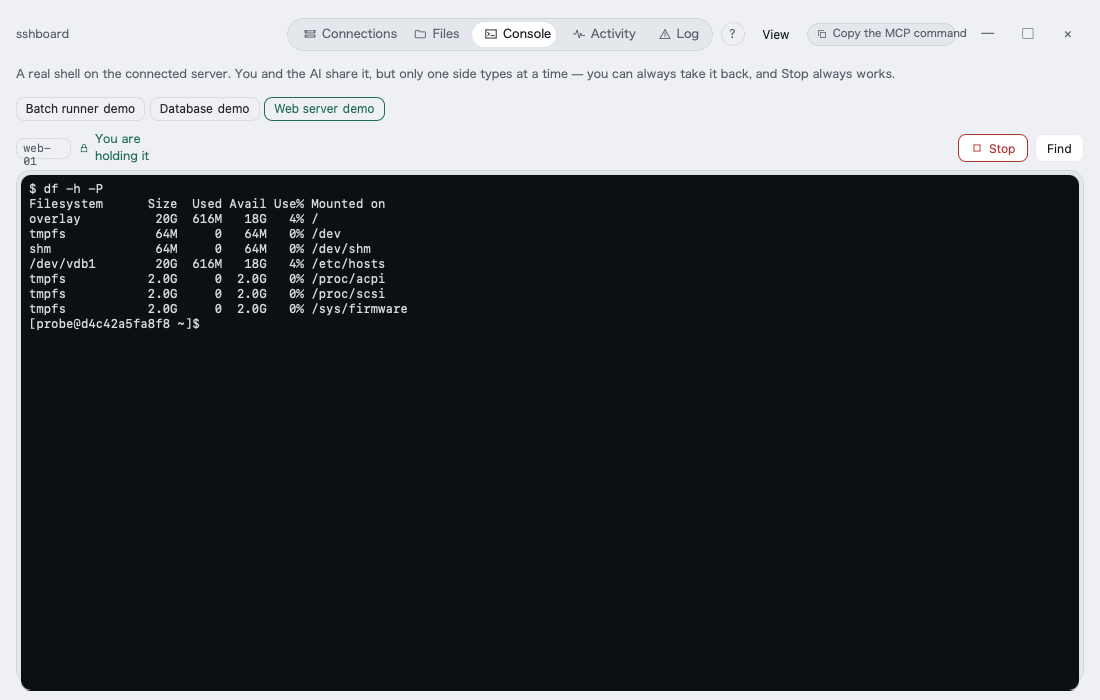
(This shot predates the split view — it shows one console with the open connections as tabs. Two panes side by side landed in 0.1.21.)
"Mail stopped arriving and I don't know where to look"
You ask the agent. It reads /etc/postfix/main.cf, checks the service, tails the log —
over the same SSH session you are already on, and you see each step as it happens.
It cannot run an arbitrary command to do it: there is no run_command(cmd) tool.
[Human] $ cd /var/www
[AI]    $ df -h
Filesystem      Size  Used Avail Use% Mounted on
/dev/vda1        50G   38G   10G  80% /
[AI]    read /etc/postfix/main.cf  (4.1 KB)
"I want help, but not an agent loose on my server"
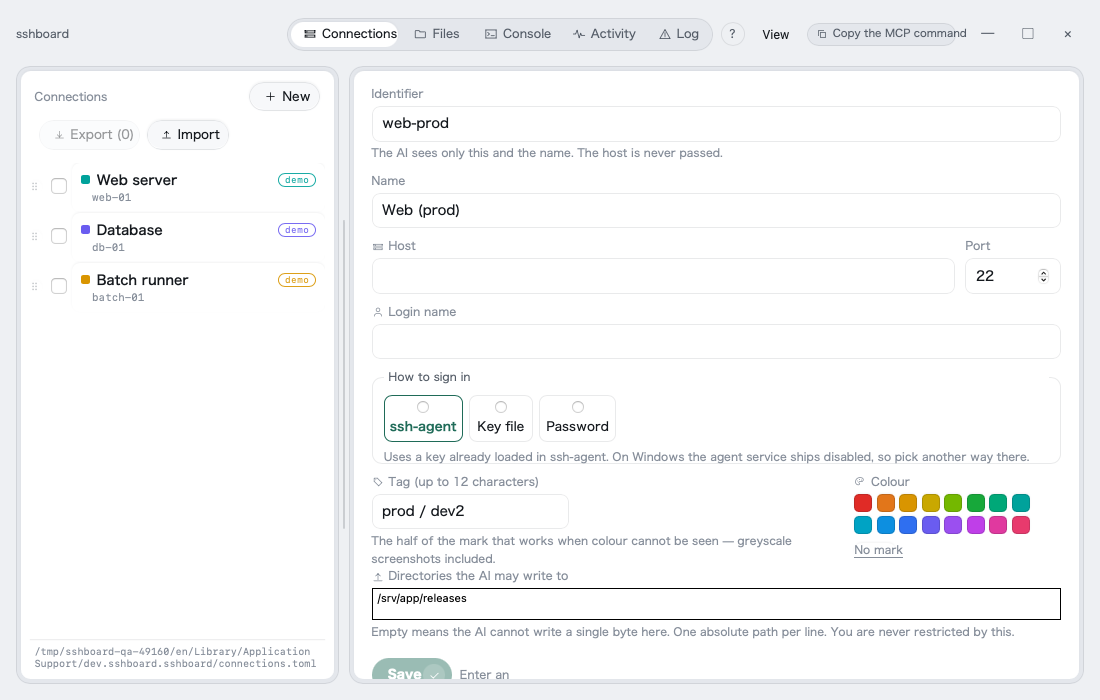
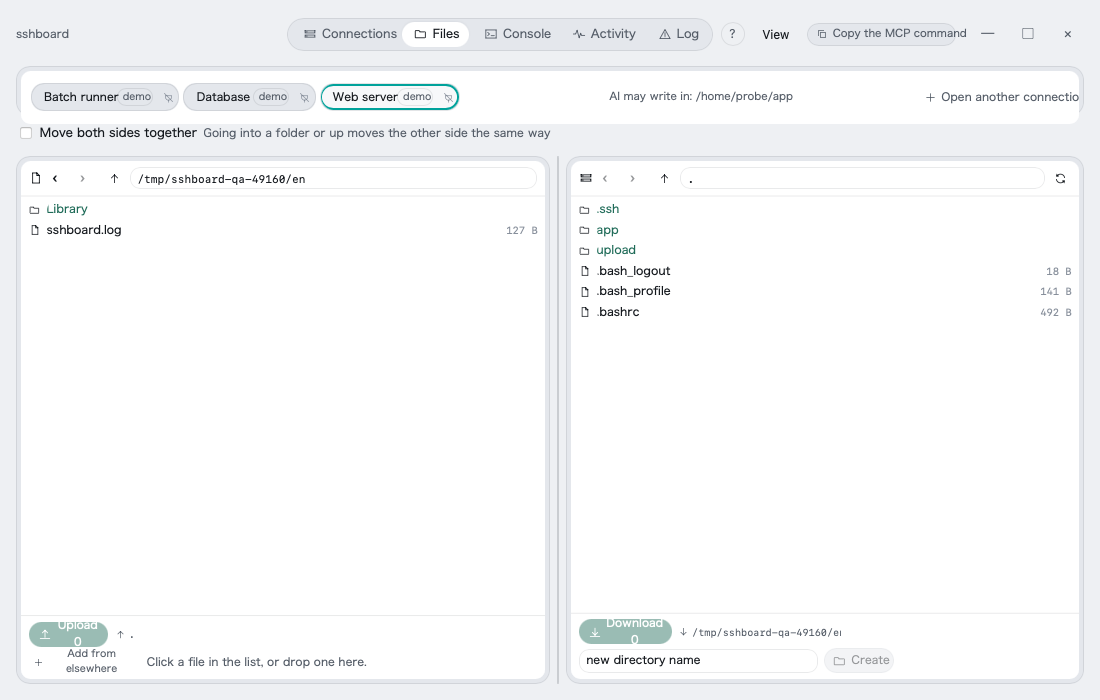
The agent may write only inside directories you listed, one connection at a time. The list starts empty, so it cannot write a single byte until you say where. Delete, rename, move, chmod, restart, package installs, sudo — none of them exist for the agent. You are not restricted anywhere.
Try it in five minutes
Install the app, then point your agent at it. There is nothing else to run — the MCP server lives inside the app.
# 1. a throwaway SSH server on your own machine (needs Docker)
sh tools/test-server/up.sh
ssh-add tools/test-server/.key

# 2. the app
pnpm install
pnpm --filter desktop tauri dev
Register 127.0.0.1:2222, user probe, connect, then press Copy the MCP command in
the window's title bar and paste it into your agent:
claude mcp add --transport http sshboard http://127.0.0.1:22022 \
  --header "Authorization: Bearer <the token the button copied>"
Prebuilt installers are on the releases page (Windows x64 / ARM64, macOS Apple Silicon). They are not code-signed, so SmartScreen and Gatekeeper will both stop you the first time.
What you see while the agent works
Every operation, yours and the agent's, lands in one band. You do not have to ask what it did.
![The activity band: one line per operation, with [AI] marking the agent's](site/shots/en/band.png)
When something fails, the same log the agent reads over MCP is on your screen — which stage it reached, why it stopped, and what to do next. It carries no hostnames, no usernames and no secrets.
Why this exists
There are services still running on ordinary shared hosting and VPSes. Maintain one of those with an AI agent and this happens every single time:
you : I want to fix this service's config
AI  : I can't see the server, so please tell me its state
you : (open a terminal, look, paste)
AI  : now show me that config file too
you : (open SFTP, download, paste)
This tool exists to delete that round trip. The agent does not need to operate your server. Letting it see is enough.
How you actually use it
This is not a tool you drive by clicking buttons. You talk to an AI agent in your terminal, and the agent calls sshboard's built-in MCP server.
you → the AI agent in your terminal: "mail isn't arriving. look into it"
              │
              │  MCP (inside the app — no extra process)
              ▼
        sshboard  ── one SSH ──▶  server
              │     (sftp / exec)
              ▼
   an [AI] line scrolls past in sshboard's window
   ── you are just watching. what it read and what it typed is visible as it happens
[Human] $ cd /var/www
[AI]    $ df -h
Filesystem      Size  Used Avail Use% Mounted on
/dev/vda1        50G   38G   10G  80% /
[AI]    read /etc/postfix/main.cf  (4.1 KB)
You are not restricted. The two-pane file browser and the terminal tab work like any other SFTP client and terminal. Only the agent's side is fenced.
What the agent may call (Phase 1 — reading)
list_connections / list_directory / stat / read_file / search / download /
disk_usage / process_list / service_status / runtime_versions / read_log /
network_listen / run_readonly (allowlist)
There is no run_command(cmd). One such tool does everything, and once you have it
the only thing standing between an agent and a destructive command is a promise not to
use it. A promise is a runbook, not a gate.
With run_readonly the agent may pass only an id that a person wrote into
readonly.toml. There is no argument slot. The list ships empty — until you write
it, nothing runs at all. Refusals show up in the window's activity band and are
recorded in readonly-refused.log. Adding entries is a person's job.
The one success criterion
The agent stops saying "please tell me the state of the server."
Not downloads, not stars. Whether the round trip disappeared during real maintenance.
It will not modernise your setup
- This is not a tool for migrating your server somewhere else
- Working with the setup you already have is the point
- These services will still be here in ten years. Nothing exists today that brings AI development to them
Shape
   ┌──────────┬──────────┐        ┌──────────┐
   │  files   │ terminal │        │   MCP    │
   │ two-pane │   tab    │        │          │
   └────┬─────┴────┬─────┘        └────┬─────┘
        └──────────┴───────┬───────────┘
                           ▼
              ┌────────────────────────┐
              │  Operation Engine      │  ← exactly one implementation lives here
              └───────────┬────────────┘
                          ▼
                    one SSH connection
                      (sftp / exec)
We do not keep two SFTP implementations, and we never open an SSH session you cannot see. Being invisible is the single biggest danger here.
Whoever touched what flows into the same band. Different surfaces, one record.
[Human] $ cd /var/www
[AI]    $ df -h
Filesystem      Size  Used Avail Use% Mounted on
/dev/vda1        50G   38G   10G  80% /
[AI]    read /etc/postfix/main.cf  (4.1 KB)
Phase 1 is read-only
No writes at all. Every intended use — incident triage, mail-config investigation, writing up a proposal — is reading. That makes the risk close to zero, which means you can point it at a live production server on day one.
There is no run_command(cmd)
Put one arbitrary-command tool in place and it can do everything. That is exactly why it does not exist.
- Hand it over and the only remaining defence against a destructive command is a promise
- A promise is a runbook, not a gate
- With an allowlist, dangerous commands are not expressible
What readonly.toml looks like (a person writes it)
version = 1

[[command]]
id = "uptime"          # the only value the agent may pass
run = "uptime"         # what actually runs. **exactly what a person wrote**
description = "how long it has been up"
The product ships with zero entries. Nobody has the list of what real maintenance
needs, and filling it in by guesswork gets it wrong. Refused calls pile up in
readonly-refused.log — read that, and add only what was genuinely needed.
What this cannot verify: whether the run you wrote is truly read-only. The
product cannot know. No machine can tell uptime from rm -rf / by inspection. What
this prevents is exactly one thing: the agent composing a command string.
The human side (the GUI) is not restricted. Use it as an ordinary SFTP client and terminal. Only the agent's side is fenced.
State-changing operations (operations.toml)
The list ships empty. Until you write this file, the agent can run nothing.
This is a separate file from the read allowlist (readonly.toml), so that write
operations never live in a file called readonly. Telling them apart by name is the
point. Put it next to connections.toml.
version = 1

[[operation]]
id = "restart-httpd"
run = "sudo systemctl restart httpd"
description = "restart Apache"
max_per_hour = 3
| field | what to write |
|---|---|
id | the only thing the agent may pass. Short, readable |
run | what actually gets typed. The agent cannot compose it |
description | shown on the approval dialog. Words you will understand in six months |
max_per_hour | hourly ceiling. 0 is rejected (there has to be a place it stops) |
Gates it passes through before running
- It is in the list a person wrote. Unknown ids are refused, and the refusal is recorded
- It is under the hourly ceiling
- A person approves it on screen. The agent's first call is always refused, and the window shows what would actually run
- An approval is spent once. One approval, one run
- An approval expires after five minutes. People press allow and the agent never
calls back (the conversation moves on). We do not leave approvals lying around —
with
become = "ask", the password is dropped here too
A person at the screen does not pass 3–5. They are looking at it.
The one exception is the become = "ask" password — that is not approval, it is a
credential, and the product cannot invent it.
Refused even if you write it down
No setting enables these. They are rejected even when present in operations.toml.
- The cage itself —
sudoers/visudo/authorized_keys - Keys —
.ssh/id_rsa/id_ed25519/id_ecdsa - Where passwords live —
/etc/shadow//etc/gshadow - sshboard's own config —
connections.toml/readonly.toml/operations.toml - Users and roles —
useradd/usermod/userdel/groupadd - Destruction —
mkfs/fdisk/dd/rm -rf
The agent cannot widen its own cage. That is what this list is for.
Operations that need root (become)
operations.toml decides which commands may run. How privilege is obtained is
written per connection (connections.toml).
[[connections]]
id = "..."
become = "sudoers"   # scope is cut on the server side (recommended)
# become = "ask"     # ask the person when it is needed. **never stored**
# omit it entirely   # do not elevate
become | what sshboard types | password |
|---|---|---|
| omitted | exactly what you wrote in run | none |
sudoers | sudo -n … | none (sudoers.d holds the scope) |
ask | sudo -S -p '' … | typed by a person, on screen, in the moment |
Only a run that starts with sudo is touched. Everything else is left byte for
byte. Choosing ask does not make non-sudo operations ask for a password.
sudoers (recommended)
<user> ALL=(root) NOPASSWD: /usr/bin/systemctl restart httpd, /usr/bin/systemctl reload httpd
# always through visudo. get it wrong and nobody can sudo any more
sudo visudo -f /etc/sudoers.d/sshboard
sudo chmod 0440 /etc/sudoers.d/sshboard
This is a gate the OS enforces, not a promise the app makes. The scope is written in
sudoers, so a person can audit it afterwards, and sshboard gains no secret.
Check that it works:
sudo -n systemctl reload httpd    # passes with no password prompt → good
sudo -n systemctl restart nginx   # not listed → should be refused
If the second one succeeds, your scope is too wide.
ask (when you cannot touch sudoers)
Not being able to touch the server is a real situation — rented, no rights, too many
machines. On a server where sudo -n answers "a password is required", the sudoers
route was never open. That is what ask is for.
A password field appears on the approval dialog and a person types it there.
- Never stored. Not on disk, not in the OS credential store
- Never on the command line. It goes in over stdin, so it does not show up in
ps - Never on screen and never in the log. What appears is
$ sudo -S -p '' …and no more - One approval, one run. Dropped the instant it is used
- Refuse, and it is dropped there and then
Reading a log only root can read works the same way:
[[operation]]
id = "read-letsencrypt-log"
run = "sudo tail -n 200 /var/log/letsencrypt/letsencrypt.log"
description = "find out why the certificate renewal failed"
max_per_hour = 6
This does not apply to the read allowlist (readonly.toml). If it did, every read
would ask for a password. Reads that need root belong in operations.toml.
Becoming root first with su is not recommended — the scope disappears. A route
for servers that only have su - does not exist yet (.claude/decisions.md D48).
What the product cannot guarantee
Whether an operation really does only what it says, the product cannot verify. What
runs is a string a person wrote. As with readonly.toml, that is the part a person
has to read and confirm. Which is why sudoers makes the OS enforce it.
There is no way to deliver an approval to someone who is away from the screen yet
(.claude/decisions.md D47 — undecided). Today only a person at the screen can
answer. With nobody there, the operation does not run.
What this will not do
| not doing | why |
|---|---|
| Give the agent write access (Phase 1) | Every use is reading. Lets us target production on day one |
| Give the agent arbitrary commands | An allowlist prevents it structurally |
| Give the agent sudo | Phase 1 does not deal with privilege escalation |
| Build our own key store | Delegate to the OS credential store and ssh-agent. What you do not hold, you need not guard |
| Embed an AI chat UI | The agent lives outside the app |
| Generate reports | If it can read, the agent writes the proposal. Nothing to add |
| Push you to migrate | Working with your existing setup is the point |
Running it
This is still alpha. Before pointing it at a production server, run it once against the local test server.
Requirements
| OS | macOS / Windows (Linux is not a distribution target) |
| Rust | rust-toolchain.toml pins 1.98.0. rustup sorts it out |
| Node | 20 or newer |
| pnpm | corepack enable (npm / yarn are not used) |
| Docker | only if you want the local test server |
Keeping your key in ssh-agent is recommended. Then sshboard never receives a passphrase at all.
Start
pnpm install
pnpm --filter desktop tauri dev
Tests
cargo test --workspace         # Rust
pnpm --filter desktop test     # frontend
pnpm --filter desktop check    # type check
Local test server
It does not touch your servers at all. It creates a throwaway key and brings up one machine in Docker.
sh tools/test-server/up.sh        # up
sh tools/test-server/up.sh down   # down
Connecting an agent (MCP)
Recommended — the token is never written anywhere
# macOS
claude mcp add sshboard -- /Applications/sshboard.app/Contents/MacOS/sshboard --mcp-stdio-proxy

# Windows
claude mcp add sshboard -- "%LOCALAPPDATA%\\sshboard\\sshboard.exe" --mcp-stdio-proxy
This way the token is left nowhere (Issue #2). Started with --mcp-stdio-proxy,
sshboard runs as a relay with no window. It reads the token itself and passes it to
the running app.
- The token appears neither in
~/.claude.jsonnor in your shell history - Move the port (
SSHBOARD_MCP_PORT) and you do not have to re-register - If the app is not running you get: "sshboard is not running. Start the app and try again."
Only the app opens SSH connections. The relay holds no engine and no band. It adds not one invisible SSH session (prohibition 3).
Straight over HTTP
The "Copy the MCP registration command" button at the top right of the window copies a single line, token included.
claude mcp add --transport http sshboard http://127.0.0.1:22022/mcp \
  --header "Authorization: Bearer <token>"
--transport http is required. The path is /mcp and the token goes in
Authorization: Bearer.
The port is fixed at 22022 (D33), and the token is reused, so you register once.
Restarting keeps the same URL.
⚠️
claude mcp addleaves the token in~/.claude.jsonin plain text. It is a loopback handle rather than a key, but whoever holds it can read the servers you are connected to. Rememberclaude mcp remove sshboardwhen you are done.
.mcp.json works too (also plain text on disk):
{
  "mcpServers": {
    "sshboard": {
      "type": "http",
      "url": "http://127.0.0.1:22022/mcp",
      "headers": { "Authorization": "Bearer <copy it from the MCP button>" }
    }
  }
}
If the port is taken, it does not quietly move somewhere else. The window says "failed to start (port 22022)". Set
SSHBOARD_MCP_PORTto move it.
Updates
When a new version exists, the window tells you at startup (D34).
It never replaces itself quietly. Downloading, installing and restarting are all things a person presses. This tool handles SSH keys, so it does not rewrite itself without being asked.
The update itself is signed with minisign, and Tauri always verifies it. That is separate from code signing (D12 — whether the OS shows a warning); what is guaranteed here is that the update came from us.
Things to know during alpha
- It is not code-signed. Whether Windows stops you depends on how you fetched it
(Issue #3, measured):
- Downloaded in a browser, double-clicked → SmartScreen stops you
gh run download/ CI / a script → it does not. No Mark of the Web, so SmartScreen's reputation check has nothing to trigger on- macOS Gatekeeper is untested
- The agent may write only under directories a person listed for that connection. The list is empty by default — not one byte
- The
run_readonlyallowlist is empty by default too. Nothing runs until a person writesreadonly.toml. The purpose-built tools (disk_usageand friends) work without it - The terminal is shared between you and the agent. While the agent holds it your input is locked out, and [Stop] always works
- Installers are attached to each Release (D32).
Windows gets
.msiand an NSIS-setup.exe, macOS gets.app.zip. They are unsigned, so Windows shows SmartScreen and macOS shows Gatekeeper. If a warning stopped you and you did not know what to do, please open an issue — that is what decides whether we buy a certificate (D12)
Stack
| Shell | Tauri 2 (Windows / macOS) |
| Core | Rust |
| UI | SvelteKit + xterm.js (we do not write our own ANSI parser) |
| SSH | russh + russh-sftp (both tried against 9 real machines before deciding — D6) |
| MCP | Inside the app (not a separate binary, not a separate build) |
| Credentials | OS credential store + ssh-agent |
Licence
MIT
Development rules
This repository follows a baseline set of rules for AI-agent development. See
.claude/rules/product-baseline.md and
CLAUDE.md.
- The AI commits, a human pushes (no pushing without human review)
- Tests are never deferred and never deleted
- This is a public repository. No server hostnames, IPs, usernames, personal names or personal email addresses in code, docs, commit history or screenshots
From the server's repository — third-party content, read it before running anything it suggests.
More in DevOps
audit-gap-auditor
io.github.GuardBee
OWASP MCP08 audit/telemetry gaps: missing tool-call logs, raw args in logs, disabled audit
dns-intelligence
io.github.GuardBee
DNS record enumeration, misconfiguration and dangling-subdomain detection
AppCrane
io.github.gitayg
Deploy and manage apps on your own AppCrane instance, the self-hosted PaaS for AI-built apps.
HAI-MCP
io.github.smlfg
Model-agnostic MCP control plane for HAI: bounded missions, owner-gated actions, drift checks.
VMware Pilot
io.github.vmware-skills
Multi-step workflow orchestration for VMware MCP skills with approval gates and rollback.
VMware AIops
io.github.vmware-skills
AI-powered VMware vCenter/ESXi VM lifecycle and deployment with 60 MCP tools.
Listing from the official MCP Registry · repository facts from GitHub, just now.