- Language
- TypeScript
- Last commit
- 1h ago
- Forks
- 0
- Open issues
- 0
- Registry update
- Oct 17, 2026
Connect
remote + npm$claude mcp add --transport http sysketch https://sysketch.vercel.app/mcpHeaders
Nothing to configure — it works as is.
Security review
Review passedReviewed 1h ago.
- tools
- 2 tools scanned
- metadata
- scanned
- packages
- 1 checked
No findings.
Tools
2render_diagram
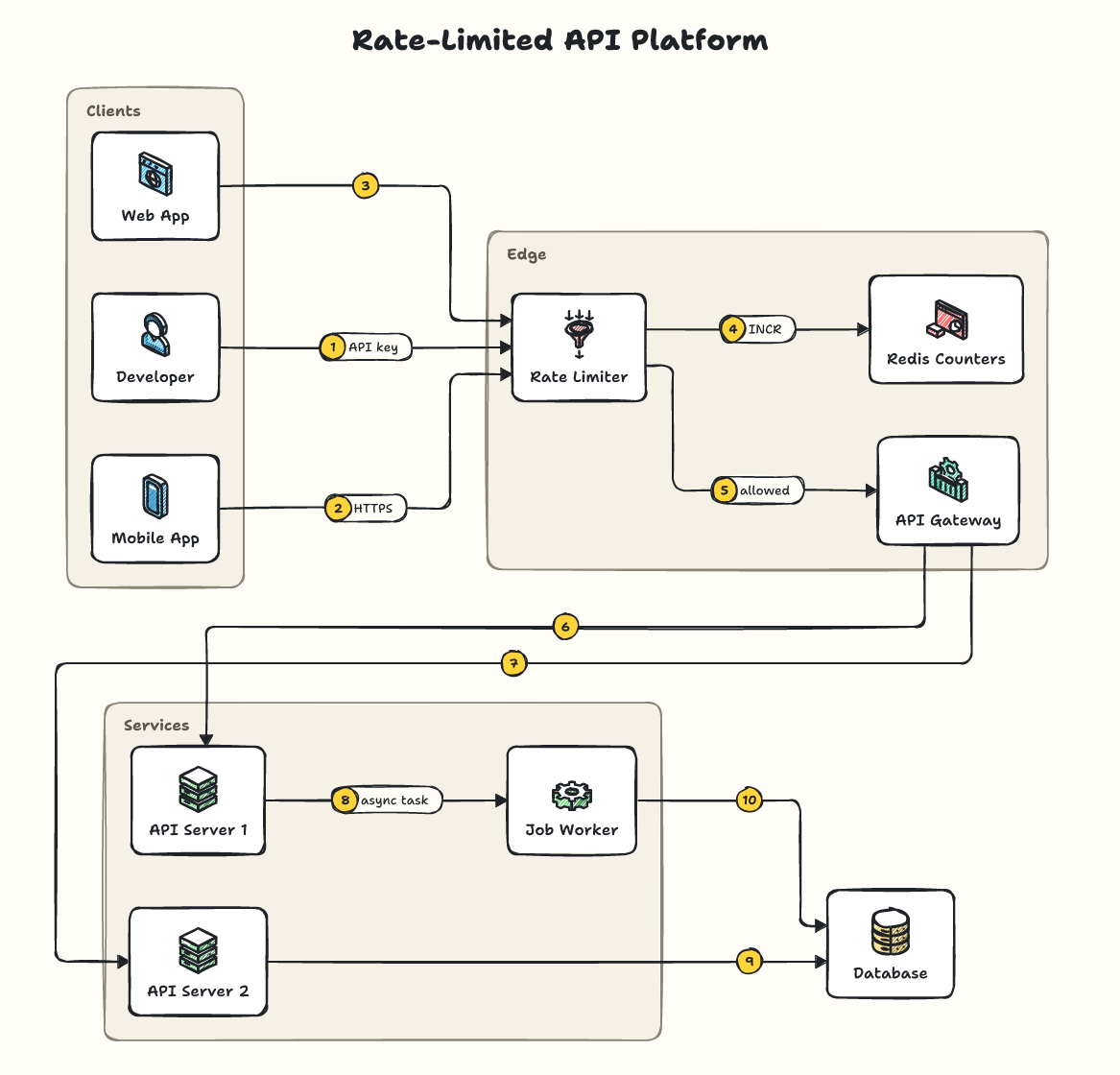
Use for any system design, architecture, data-flow or infrastructure diagram, instead of generating an image or writing SVG/Mermaid. Renders a tiny YAML spec; returns PNG/SVG links and a small preview. Spec keys: title, type (sequence: message timeline), theme (sketch|graphite|blueprint|midnight|classic), direction (omit: auto-fit; right|down only if asked), steps (false hides numbers), legend (true lists steps), nodes {id: "icon | Label | subtitle"}, groups {Label: [ids or group labels to nest]}, edges ["a > b > c | label", "a ..> b" dashed, "a <> b" two-way, "a => b" thick, "a -- b" line, "a > b [red]" color]. Ids that are icon names/aliases (client, lb, api, db, cache, redis, kafka, s3, cdn...) need no nodes entry. Arrows are numbered automatically in the order listed; don't number labels. Product names (stripe, kafka, postgres...) draw the product's logo when available, else a fitting icon; brand/icon (acme/queue) for others. Give the user the PNG link; don't generate another image
list_icons
List sysketch icon names and aliases, or search the available product logos.
sysketch-mcp
Lets Claude, Cursor and other AI assistants draw clean, hand-sketched system design diagrams with sysketch. The assistant writes a short description of your system instead of drawing the image itself, which makes diagrams faster, cheaper and consistent.
Setup
You need Node.js 20 or newer.
Claude Code: run once in your terminal:
claude mcp add sysketch -- npx -y sysketch-mcp
Claude Desktop, Cursor and other assistants: add this to the assistant's MCP settings, then restart it:
{
  "mcpServers": {
    "sysketch": { "command": "npx", "args": ["-y", "sysketch-mcp"] }
  }
}
Diagrams are saved in the folder your assistant runs the server in (your project, in Claude Code and Cursor). Claude Desktop starts servers outside any project, so there they go to a sysketch folder in your home folder. To choose a folder, add "--dir", "/path/to/folder" to args, or set the SYSKETCH_DIR environment variable.
ChatGPT, Claude on the web, Perplexity and other AI chats: you don't need this package. Add https://sysketch.vercel.app/mcp as a custom connector instead (details).
Use
Ask your assistant, for example:
Use sysketch to draw a ride-sharing system as a PNG.
The diagram is saved in diagrams/ inside that folder, together with its description, so you can ask for changes later: "add a notification service", "use the blueprint theme". Only a one-line summary comes back into the conversation, never the image data.
Measured with Claude Code (Sonnet) on 5 system design requests: 4,352 output tokens with sysketch vs 77,518 when the assistant drew the SVG itself, about 18x fewer (benchmark).
Tools
| Tool | What it does |
|---|---|
render_diagram | Draws a diagram from a description (spec) or a file (file) to .svg or .png, with an optional theme. preview: true returns the image to the assistant (off by default). |
list_icons | Lists the icons and recognized names; logos searches installed official logos. |
The tool definitions add about 450 tokens to each session.
Official logos (optional)
When official logos are installed, product names like s3 or stripe show the real logo. See the logos guide.
More examples, themes and the full spec: github.com/Tonys-Coding/sysketch
MIT License.
From the server's repository — third-party content, read it before running anything it suggests.
More in Media
Style Look Lab
com.stylelooklab
Recommend hairstyles for a face shape, with links to virtually try each one on your own photo.
Audio MCP
io.github.mshark1
Audio perception for AI agents: measure, see, compare, edit and synthesize sound locally.
shotbox
io.github.mishan
Sealed X11/Wayland sessions to see, drive and check real GUI programs: a11y, pictures, sound.
ClassCAD
io.github.awv-informatik
Build and verify CAD parts and assemblies with the ClassCAD engine, locally, no server needed.
WikiBrand
org.wikibrand
Logo, colors, typefaces, tone of voice and CSS theme of any brand, read from its own website.
Ordkort
com.ordkort
Flashcard decks with pictures and card designs for a free vocabulary site in 60 languages.
Listing from the official MCP Registry · repository facts from GitHub, 1h ago.